Otter Free Plan Limits: Minutes, Imports, and Saved History
Otter Basic has separate limits for monthly minutes, long recordings, file imports and history. Find which one you hit and what fixes it.
Summary
- Otter Basic gives you 300 transcription minutes a month and access to 30 minutes per conversation.
- You get three file imports in total. Basic shows your 25 most recent conversations; older ones are archived, not deleted.
- The limits are separate. Minutes left over don't buy another upload or unlock a longer transcript.
We make Vocena, which comes up later as a caption app, not a replacement for Otter's meeting features. The limits below come from Otter's own help and pricing pages, read on October 1, 2026. We didn't test them with a paid Otter account.
On this page
The four Basic limits
Otter's Basic plan limits article lists four separate limits:
- 300 transcription minutes a month.
- Only the first 30 minutes of each conversation's or import's transcript can be read.
- Three audio or video file imports per account, in total, not each month.
- The 25 most recent conversations; older ones are archived, not deleted.
Each one runs out on its own. Minutes left over don't give you another upload, and a new month doesn't lengthen a transcript you already have. So when Otter says you've hit a limit, work out which of the four it is.
You've used the monthly minutes
When the 300 minutes are gone, Otter says you can't record or import until your next monthly cycle. Otter's article on when monthly minutes reset ties the reset to the date and time your billing cycle started, not the first of the month, and unused minutes don't roll over. Imports, in-app recordings, integrations and meeting recordings all use minutes.
To see what's left, go to Account Settings → Plan on the web, or tap Account in the mobile app.
Deleting conversations won't give minutes back. Otter's Basic plan limits article says deleted conversations still count toward the limit.
A recording longer than 30 minutes
Otter's Basic plan limits article says going past 30 minutes doesn't stop the recording or the import. You can read only the first 30 minutes of the transcript. After upgrading to a paid plan, you click Unlock full transcript at the bottom of the transcript to see the rest. Waiting for next month's minutes won't unlock it.
Say you have eight 25-minute meetings in a month. That's 200 minutes, well within 300. A 45-minute interview on top still fits the monthly total, but you'd only be able to read 30 minutes of it. If long transcripts are what you need, check the per-conversation limit before the meeting, not afterwards.
Splitting every meeting into pieces to stay under 30 minutes means tracking the total yourself and losing the thread between files.
Your three imports are used
Imports are counted per account, once. Waiting for the monthly reset doesn't add any. More imports come with a paid plan; Otter's pricing page lists 10 a month on Pro. Keep the original file somewhere you control before you upload it, and don't spend an import on a test you could do by recording.
An older conversation is missing
Otter's Basic plan limits article says Basic shows your 25 most recent conversations. Older ones are archived, not deleted, and the paid plans show your full history.
Paid plans
Otter's pricing page lists Pro at $16.99 per user per month billed monthly, or $8.33 per user per month billed annually. A lower starred price is only for India-issued credit cards. Pro includes 1200 in-app recording minutes a month, meetings up to 90 minutes and 10 audio or video imports a month.
Basic keeps live transcription, speaker identification, audio playback and the Zoom, Microsoft Teams and Google Meet connections, with MP3 and TXT export. Other export formats come with paid plans, not with a reset.
Before you upgrade, write down your longest meeting, how many files you import, which export you need and who needs the result, then check each against the plan you're choosing. If your employer pays, ask which workspace should own the recordings before you buy a personal plan.
For a wider comparison, including languages, see Notta vs Otter.
If you only need to read speech as it happens
On a Mac, try the caption window built into macOS first. Apple's Live Captions guide for Mac puts it under System Settings → Accessibility → Live Captions, with a choice of computer audio or the microphone. It needs a Mac with Apple silicon and is available only in some languages and regions. Apple's guide describes the caption window but doesn't cover saving or exporting a transcript.
Vocena runs on Mac (macOS 15.5 or later) and on iPhone and iPad (iOS or iPadOS 26 or later), with free live captions with no time limit and no sign-in. On a Mac it captions the microphone or system audio in a floating window. Each session is saved in the Library on the device; audio is recorded only when you start a recording, and you stop it yourself. Live captions mark each line as microphone or system audio, not by person, so if Otter's speaker labels are why you use it, keep that in mind. Translation and transcribing imported recordings are paid.
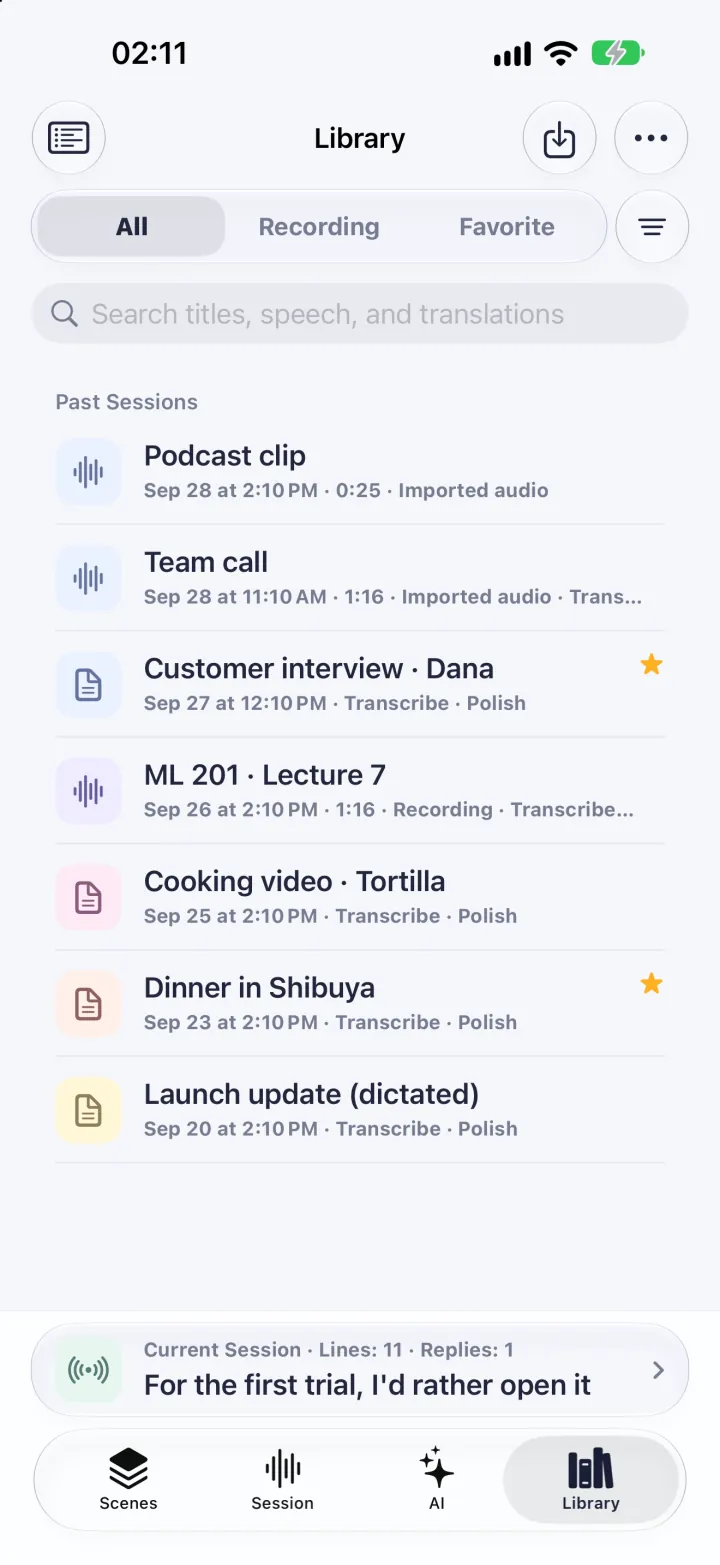
The picture shows the iPhone Library with demo sessions.
If you care most about keeping audio on your own Mac, our guide to offline Otter alternatives for Mac compares the options.
Before you rely on any transcript
Export what you need while you can still read it, then open the file in the app you'll use and check that the beginning and end are there. Check names, numbers, decisions and who said what against the audio before you share it. Agree with the other people in the meeting about recording and sharing before you start.
Sources and checks
- Pricing | Otter.ai Checked
- Conversation, import, and app limits on the Basic free plan Checked
- When will my monthly minutes reset? Checked
- Get captions of spoken and computer audio on Mac Checked
Device testing
We have not tested these steps on a device. This guide is based on official documentation and Vocena's product information.